EG4 Community Forum

12000xp dongle wifi...
 
Notifications
Clear all

12000xp dongle wifi light flashing, does not generate hotspot, no connection to Internet

3 Posts
3 Users
0 Reactions
87 Views
Posts: 4
 Nick
Topic starter
(@nick)
Active Member
Joined: 3 weeks ago

I commissioned this system in December and have had it up and running for about a month without issues.  The external Wi-Fi got shut off briefly during maintenance, I haven't been able to connect since.  Just a single flashing wifi light on the dongle (DJ series).  I've attempted to reboot the dongle several times holding the button down per  instruction; removed & reinserted a few times to make sure it's in there all the way; shut the inverter completely down, waited 15 minutes for capacitors to discharge, fired it back up and still no joy.   Does not seem to generate the initial hotspot I should see on my phone.  Nor coñnect to local external wifi or to a hotspot on my phone.  Meanwhile, the inverter seems to be functioning normally. 

Any ideas on fixing this?  Do I need to replace the dongle?   Thanks in advance.


2 Replies
EG4 Eric
Posts: 979
Admin
(@eg4eric)
EG4 Online Support
Joined: 1 year ago

Just to be clear, you're saying that the dongle network is not showing up when you are searching for Wi-Fi networks it on your phone?

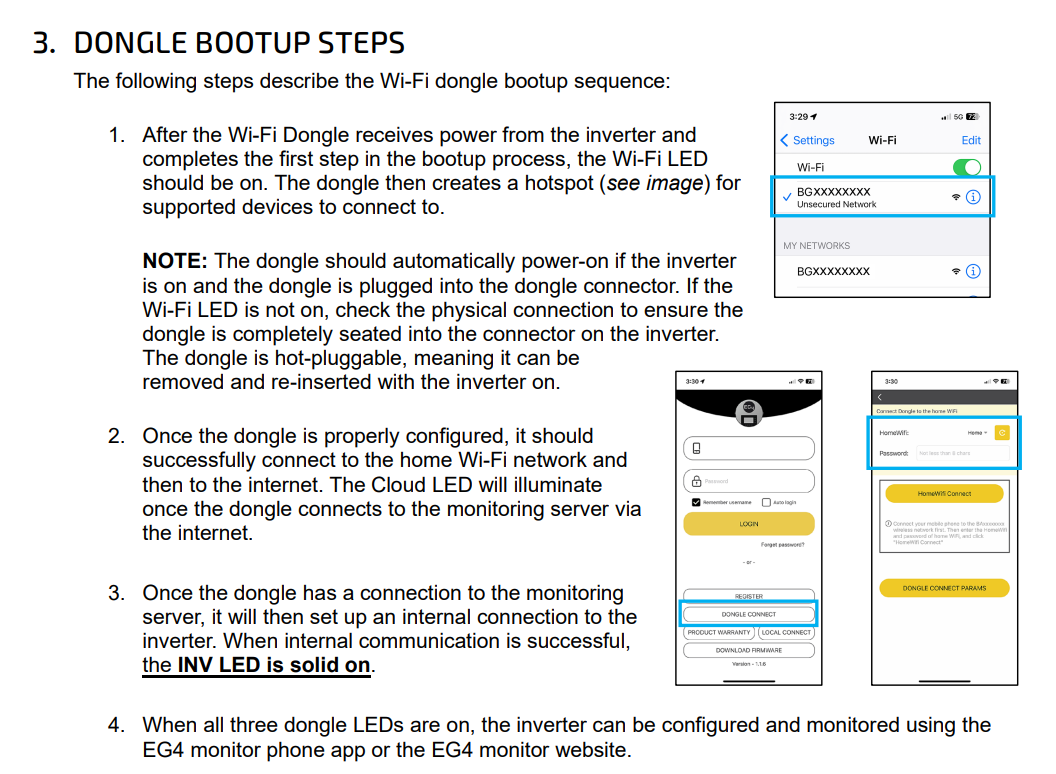
I would try holding the reboot button one more time for about 5 seconds and then trying these steps again. 

image

Please let me know if that doesn't work. 


Reply
Posts: 12
(@yooperjay)
Active Member
Joined: 4 weeks ago

Hi Nick,

Had the same issue.  Make sure the dongle is connecting to a 2.4Ghz wireless network not a 5Ghz wireless.  My DJ series was working fine and after maintenance wouldn't connect again...just the single flashing light. 

If it helps, I have Starlink and had to "Split" the network into 2.4 / 5 Ghz ... once I connected the dongle to the 2.4Ghz wireless network everything started working again.

Thought it was a fluke, but a neighbor / friend had the same issue and this fix worked for his setup as well.

Hope this helps you out!


Reply
Share: