EG4 Community Forum

"Get Boot Info" fai...
 
Notifications
Clear all

Question "Get Boot Info" fails during firmware update on a Lifepower4 v1

6 Posts
3 Users
0 Reactions
588 Views
Posts: 1
Topic starter
(@mixma242)
New Member
Joined: 6 months ago

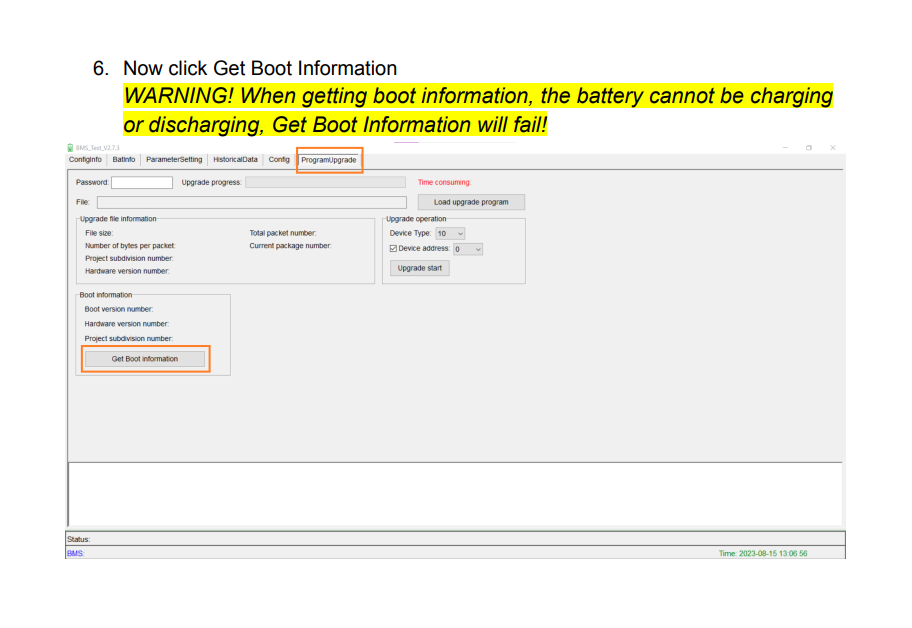
I have 2 older EG4 Lifepower4 48 100AH V1's I bought from SS. These were purchased back in 2022 and have never been used. I am trying to upgrade the FW on them, and when I get to step 6 in the official upgrade guide where it says to get boot information, clicking the "Get Boot Information" button in the app results in a "Get boot information failed!" msg. I can see that there is communication between the app on my laptop and the battery because as soon as I click that button in the app I can see by LED's on the battery that it is doing a soft restart, but that info is not getting to the app. Both batteries have the same behavior.

There is nothing else connected to the batteries other than the communication cable. No power or BMS cables.

I am using the RS485 I purchased for this from SS. It works, as I had no problems upgrading the FW on the V2's I have with the same cable. Also, the app must be using the cable in order to trigger the reboot on the batteries.

Thank you!


5 Replies
EG4 Eric
Posts: 902
Admin
(@eg4eric)
EG4 Online Support
Joined: 1 year ago

When you are updating the firmware do you have the communication cables disconnected on both batteries?


Reply
Posts: 2
(@supered9000)
New Member
Joined: 2 weeks ago

I'm having the same issue, I have 3 V1 EG4 LifePower4 batteries and I am unable to successfully run "Get Boot Information" on any of them.

There are no other communication cables connected, and no power cables connected.

I have not attempted to update the firmware yet because I'm trying to determine which firmware file to use first by clicking "Get Boot Information" however it fails every time with "get boot information failed"


Reply
1 Reply
EG4 Eric
Admin
(@eg4eric)
Joined: 1 year ago

EG4 Online Support
Posts: 902

@supered9000 
Are you 100% sure that the battery is not charging or discharging?

image

Reply
Posts: 2
(@supered9000)
New Member
Joined: 2 weeks ago

Yeah there is nothing connected to the battery terminals at all.

I was able to figure this out though.

I have two of the USB Read/Write cables, one of them I was able to connect to the battery and read data using the BMS_Test software without issue, the other I was not.

Both of them failed to get boot information with "get boot information failed" no matter how many times I tried.

I looked a little closer at these cables and you can see through the RJ45 Connector and the one that was working for me to read data had the green and white wires connected to pins 7 and 8 of the connector.

The one that wasn't working for anything had the wires connected to pins 1 and 2 of the connector.

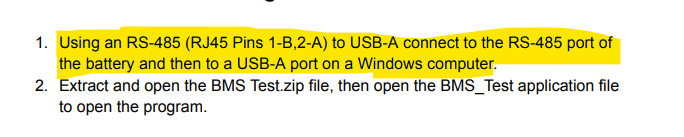
Looking closer at the documentation, it says for BMS update you need pin 1 connected to B of the rs485 adapter and pin 2 connected to A. Taking a closer look at the one cable I have which is wired to pins 1 and 2 I could see that it was incorrectly connected to the adapter with A/B swapped.

So swapping the wires such that A goes to pin 2 and B goes to pin 1 I was successfully able to "Get Boot Info" and was also successful in updating the firmware.

TL;DR Check your cables, I received two cables with my batteries from signature solar which had completely different pinouts (one was wired to pins 1 and 2, the other to pins 7 and 8) and the cable wired to pins 1 and 2 was wired backwards.....  you can read data from the batteries on pins 7 and 8 but you can't get boot info or update the firmware, this can only be done on pins 1 and 2 and the A/B rs485 wiring needs to be correct.


Reply
1 Reply
EG4 Eric
Admin
(@eg4eric)
Joined: 1 year ago

EG4 Online Support
Posts: 902

@supered9000 
That's correct and I'm glad you were able to figure that out! We rarely have that issue where the cables get wired wrong, but it does happen sometimes!

image

Reply
Share: