@samjam24x7
The dongle does not need to be activated with a code. You only need to do the following
-
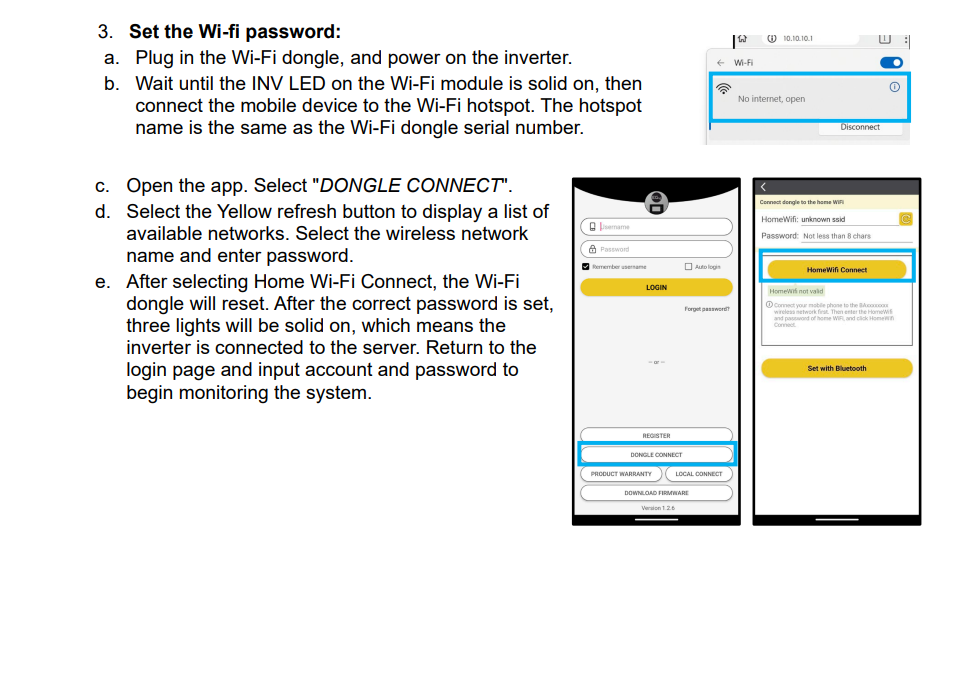
Connect your phone to the dongle’s Wi-Fi network.
-
Open the app and select Dongle Connect.
-
Enter your home Wi-Fi credentials.
-
Select HomeWiFi Connect.
-
The dongle will connect to your Wi-Fi network and the server.
-
Once connected, all three lights should be solid (steady).
If this doesn't work for you, please let me know and I can send you a replacement dongle.