
Notifications
Clear all
Product Launches
20
Posts
7
Users
3
Reactions
1,539
Views

Topic starter
@eg4eric announced some important improvements with new firmware for this battery.
How does someone upgrade that firmware wirelessly?
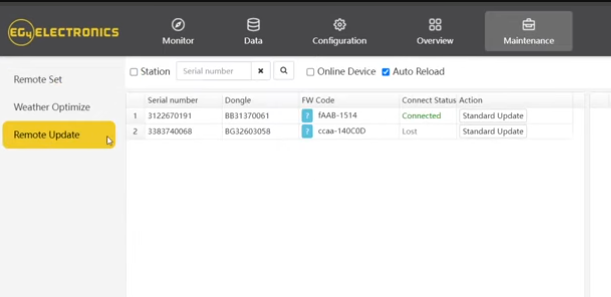
Go to the Maintenance tab and select Remote Update. You should be able to perform a standard update from there, If the battery is online. If you’re unable to see it or proceed with the update, please let me know. I'm not 100% sure if this feature is available to end user accounts as of now.
Posted : January 12, 2026 2:55 pm

My FlexBoss18 and GridBoss show in Remote Update, but not the 314Ah battery. Antenna is installed.
Are there instructions to get it to appear?
Posted : January 12, 2026 7:24 pm
Topic starter
@not-a-chef
If you share your inverter's serial number or your station name, I can double check on this for you.
Posted : January 14, 2026 9:54 pm
@eg4eric I might take you up on that. But what I really want are:
Instructions to reset the wifi/bt dongle that is internal to the battery.
Using wifiman I can't see a BAxxxx network. I can see the Bluetooth hex address and the EG4-00xx with good signal. I recall last time I tried I couldn't bt connect I assume because I never got in to turn on the allow bt connect.
So also want Instructions to get it on the wifi and enable the bt. no lights or buttons.
There is no Mac address on the case. Just a printed word wifi and the sticker below it saying Bluetooth address and the EG4-000XX.
After I reset and reconfigure it to my wifi, it should be ready to add to the remote list.
Posted : January 14, 2026 10:56 pm
I diagnosed with Signature Solar, they believe the WiFi module in the 314Ah battery is bad.
Posted : January 17, 2026 12:58 am
Page 2 / 2
Prev
