
Notifications
Clear all

Topic starter
@eg4eric announced some important improvements with new firmware for this battery.
How does someone upgrade that firmware wirelessly?
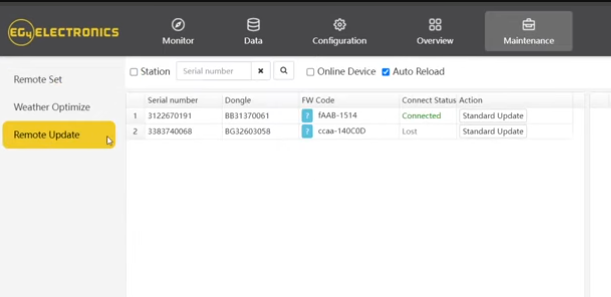
Go to the Maintenance tab and select Remote Update. You should be able to perform a standard update from there. You will have to do an OVER THE AIR update using your master inverter.
Posted : January 12, 2026 2:55 pm

My FlexBoss18 and GridBoss show in Remote Update, but not the 314Ah battery. Antenna is installed.
Are there instructions to get it to appear?
Posted : January 12, 2026 7:24 pm
Topic starter
@not-a-chef
If you share your inverter's serial number or your station name, I can double check on this for you.
Posted : January 14, 2026 9:54 pm
@eg4eric I might take you up on that. But what I really want are:
Instructions to reset the wifi/bt dongle that is internal to the battery.
Using wifiman I can't see a BAxxxx network. I can see the Bluetooth hex address and the EG4-00xx with good signal. I recall last time I tried I couldn't bt connect I assume because I never got in to turn on the allow bt connect.
So also want Instructions to get it on the wifi and enable the bt. no lights or buttons.
There is no Mac address on the case. Just a printed word wifi and the sticker below it saying Bluetooth address and the EG4-000XX.
After I reset and reconfigure it to my wifi, it should be ready to add to the remote list.
Posted : January 14, 2026 10:56 pm
I diagnosed with Signature Solar, they believe the WiFi module in the 314Ah battery is bad.
Posted : January 17, 2026 12:58 am

@eg4eric I have a set of 4 314Ah wallmount batteries. I have not found information about how to get these configured in the EG4 app via wifi. I'm not able to see the SSID on my wifi network from any of the 4 batteries. All my other panels and dongles I am successfully monitoring through the app and can see the SSID's just fine.
Posted : March 27, 2026 6:58 pm
not.a.chef reacted

I also share your observation. The option to upload the firmware remotely does not appear to be available for the the normal user. Seems that this option is restricted to installers and the teams at Signature Solar and EG4
This post was modified 6 months ago by Paapabloq
Posted : April 1, 2026 3:34 pm
Topic starter
I apologize for the confusion. There was a mix-up with some of the information provided.
The Wi-Fi antenna is intended for a feature that has not yet been released. However, you can still perform firmware updates using the Over-The-Air (OTA) feature, which allows the battery to be updated through the inverter.
At this time, OTA updates are only available to installer and distributor accounts. If you would like to update your battery’s firmware, please let us know, or reach out to your installer or distributor, and we’ll be happy to assist.
Posted : April 2, 2026 4:25 pm
not.a.chef reacted
@eg4eric I am the installer. I've already used the USB cable to access and update to the latest firmware, all good there. I was just looking for options to see internal battery data through the EG4 monitor app exemplified in other forum posts. It appeared the battery data was only coming through when the battery comms were set up in the app using a device parameter like serial# or device ID.
Posted : April 2, 2026 8:32 pm
Topic starter
@shankusmc
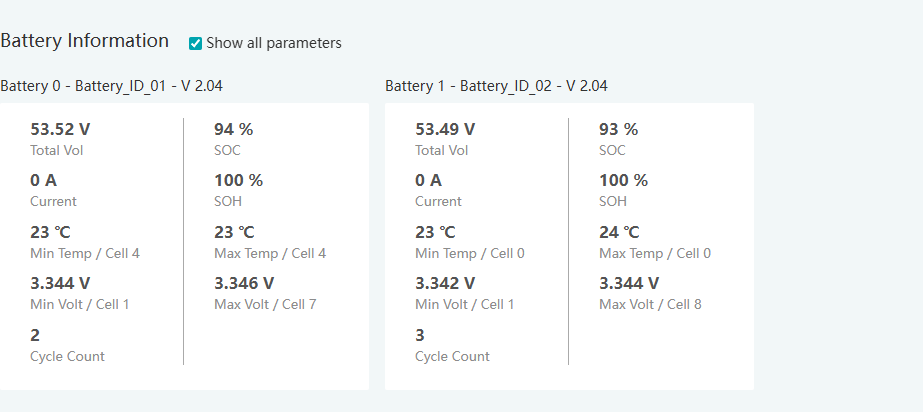
As long as you set the Lithium brand to 1, you will be able to see the battery information on the monitoring website as shown below.
Posted : April 16, 2026 8:12 pm
@eg4eric So I need to change my battery setting from "0" to "1" for my EG4 batteries? Or does it really not matter for the EG4's?
Posted : April 17, 2026 3:04 pm
Topic starter
@shankusmc
Yes, changing the Lithium brand from 0 to 1 will help with proper communication and will allow for you to see the battery details more accurately.
Posted : April 24, 2026 8:50 pm

@eg4eric ... 7 months later do you have any information about the wifi antennas, how they are supposed to be used and their purpose??
I'm gathering more details on paralleling these batteries together and also about the Wi-Fi Antenna.
It does have active balancing.
Posted : July 7, 2026 8:42 pm
not.a.chef reacted
@eg4eric ... 7 months later do you have any information about the wifi antennas, how they are supposed to be used and their purpose??
I'm gathering more details on paralleling these batteries together and also about the Wi-Fi Antenna.
It does have active balancing.
Not sure why no one here or email support has this answer but after lots of searching finally figured it out myself. The antennas are for the EG4 "BMS" app on the App Store. You can use this app to connect directly to the batteries for info using bluetooth or wifi...
Posted : July 8, 2026 11:24 pm
EG4 Eric and not.a.chef reacted
Page 2 / 2
Prev
