EG4 Community Forum

Batteries disappear...
 
Notifications
Clear all

Question Batteries disappeared overnight?

14 Posts
4 Users
3 Reactions
128 Views
Posts: 21
 ray
Topic starter
(@ray)
Eminent Member
Joined: 11 months ago

I have 6 lifepower4 V2 batteries, powering two 12,000 XP in parallel.

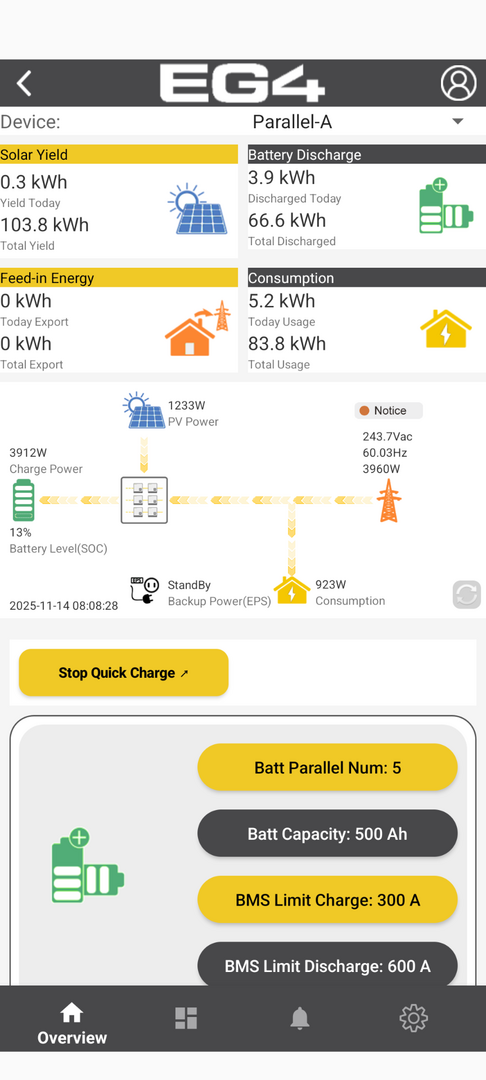
last night when I went to bed all six batteries were showing up and we had 40 percent SOC. this morning, my state of charge was jumping all over the place and I noticed that it kept switching between four or five batteries...

is this normal when the batteries get low?

as I'm typing this. my state of charge has dropped to 14%. Even though my inverter is pushing in 4,000watts into the battery, and I started at 18% this morning. what is going on? Is the BMS bringing batteries online and offline to balance them, or is something else wrong?


thanks!


Screenshot 20251114 080853

13 Replies
Posts: 21
 ray
Topic starter
(@ray)
Eminent Member
Joined: 11 months ago

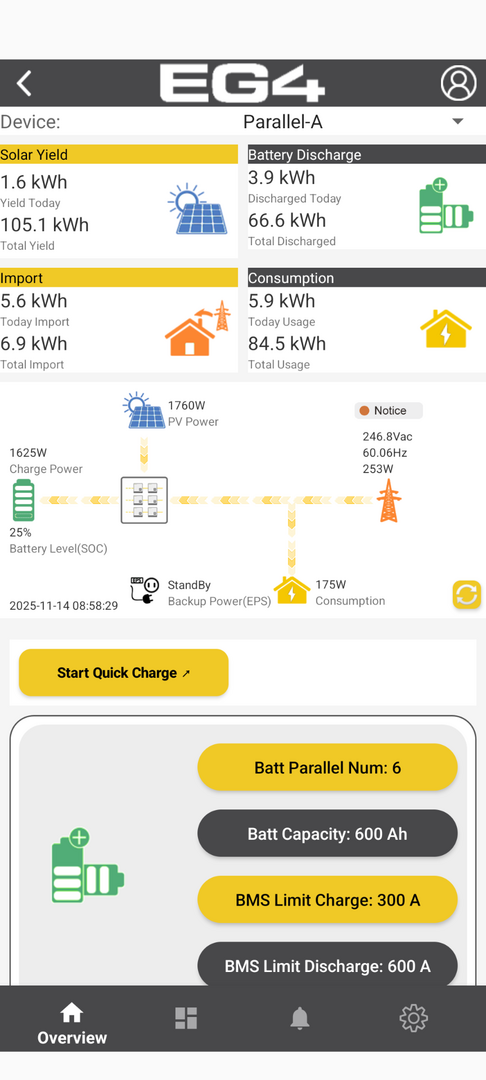
The batteries reappeared and it's at 25 percent now, but I don't know how to get it to stop using grid bypass. I have it set to only do grid bypass at 15 percent SOC. I'm not sure why it is still using the grid, when I have plenty of solar. It seems stuck in bypass mode. 

also noting that it is impossible to set the start  and end SOC for AC on the Android app. It seems the time and voltage drop downs might be reversed. I had everything set up nicely then when I went into the app to check the AC charge settings it was all blank, and when I changed the drop down from time to SOC it reset everything...

but, it should not be using the grid right now as far as I can tell. what settings do I need to look at to make sure that this is not using the grid when I have 25% battery? it should only use the grid when the battery drops below 15% per the settings I have. 

The notice is for low voltage, which is no longer the case, but there's no way to clear that in the app that I can find... Is it stuck in the state because of the low voltage warning? do I need to manually turn off the grid breaker to get it to go back to its normal operation?

Screenshot 20251114 090253

Reply
1 Reply
(@tonyinmemphis)
Joined: 1 year ago

New Member
Posts: 1

@ray You may have the same problem i having but I am on lead The system is reading the battery volt right but i have a 2nd battery disconnect if i turn the 2nd disconnect off the system could show the charging dc voltage This would be the 59.5V but it pushing 56.0 volt out of the inverter so battery never get fully charged. Some of my power flashing to and found 1 of the 4 load breaker tripped L1 load to grid L1 (0 volts) not tripped L2 load to L2 grig(53volts) triped leg. none of the bars down as not tripped. Just a heads up.


Reply
EG4 Eric
Posts: 804
Admin
(@eg4eric)
EG4 Online Support
Joined: 1 year ago

What is your inverter's serial number or station name? I can take a look at it for you. For the Batteries SOC, you can Top balance them. Charging them to 57V. You can also separate each battery and measure the voltage to make sure they are all pretty close to the same voltage. 


Reply
Posts: 21
 ray
Topic starter
(@ray)
Eminent Member
Joined: 11 months ago

Eric, it switched back over off the grid. but, the issue is with the mobile app, it does not correctly set the AC charge parameters. I was able to get it to set correctly using the legacy settings page on my PC . and I had to set both inverters settings. I think what happened is I use the mobile app to try and change the settings but it does not support changing AC charge state of charge settings. seems like a bug maybe.

I am still getting a low voltage warning though. my understanding is these battery should be self-balancing via the BMS?

station name is SoozlerRanch 

appreciate it!


Reply
1 Reply
EG4 Eric
Admin
(@eg4eric)
Joined: 1 year ago

EG4 Online Support
Posts: 804

@ray 
Where did you see or hear about the Self-Balancing via BMS? 
I just want to make sure we clarify any confusion.


Reply
Posts: 21
 ray
Topic starter
(@ray)
Eminent Member
Joined: 11 months ago

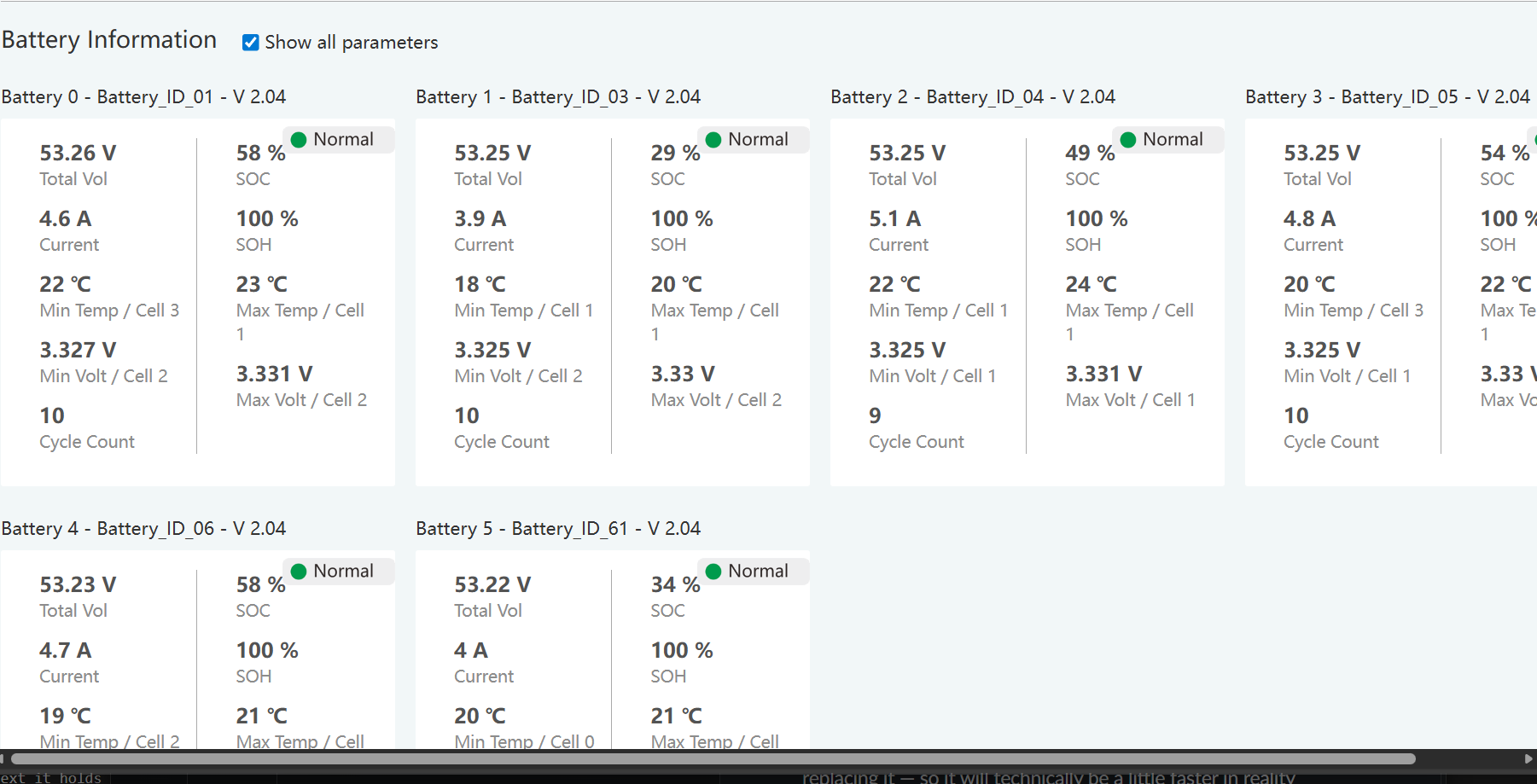
Okay. I get way more information on the desktop site. It looks like while the voltages are all very close the SOC is widely different between the batteries. My understanding, which could be wrong, is that the system is designed to balance the batteries automatically. I.E. Lower batteries will get more current to try and balance out. I've got the battery cables as balanced as feasible. Is this something that will resolve itself or do I need to take some corrective action to get those two batteries with the low SOC to get in line with the other ones because I think this is what caused the problems. Those two batteries went off line and didn't go back online until I power cycled them... at which point they started charging again but had fallen behind the others since the system had taken them down due to low voltage, but it was still charging the other 4 batteries. 

image


Reply
1 Reply
(@jlankford)
Joined: 1 year ago

Estimable Member
Posts: 160

Posted by: @ray

Okay. I get way more information on the desktop site. It looks like while the voltages are all very close the SOC is widely different between the batteries. My understanding, which could be wrong, is that the system is designed to balance the batteries automatically. I.E. Lower batteries will get more current to try and balance out. I've got the battery cables as balanced as feasible. Is this something that will resolve itself or do I need to take some corrective action to get those two batteries with the low SOC to get in line with the other ones because I think this is what caused the problems. Those two batteries went off line and didn't go back online until I power cycled them... at which point they started charging again but had fallen behind the others since the system had taken them down due to low voltage, but it was still charging the other 4 batteries. 

-- attachment is not available --


Your batteries are all balanced, indicated by the voltages being the same, and guaranteed by the fact that you have them all tied together in parallel. The reported SOC on each battery is different due to "SOC drift", which is a very common behavior. As Eric hinted, the way to correct the SOC on all the batteries is to fully charge the entire bank to 56 or 57V. The SOC drift behavior will be ongoing, and a full charge periodically will reset each battery to a good 100% reference point.

You should note that all of your batteries' SOC are probably wrong at this point. In your screen shot, 53.2V is pretty low for a battery that is under charge with a 56V charge voltage applied. It's possible that all of your batteries in that screen shot were near an actual SOC of about 20% or lower - nowhere near the 58% that some of them show. That's the reason some of your batteries "disappeared" - when you thought you were at 40% SOC at the start of the night you actually pulled the battery bank down to near 0% and a couple of them reached shutdown voltage.

If you're not able to fully charge your battery bank frequently, then you need to get in the habit of following voltage rather than SOC to know what your charge state is, and you need to use volts control rather than SOC control in your settings.

Here is a video that does a pretty good job explaining the "SOC drift" that you are experiencing. It's a very common behavior - my system does this too.



Reply
Page 1 / 2
Share: