EG4 Community Forum

Battery details mis...
 
Notifications
Clear all

Battery details missing after firmware update

6 Posts
4 Users
2 Reactions
153 Views
Posts: 5
Topic starter
(@james)
Active Member
Joined: 3 weeks ago

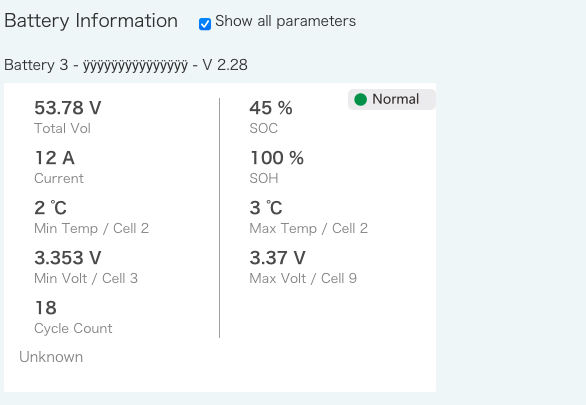
Have two FlexBoss21's, four 280Ah All Weather Wallmounts, and a Gridboss. Just upgraded the batteries to S02T25 and Z02T28, now I only see this in the monitoring site. It does see the 4 batteries under devices. Battery setting is Lithium and Brand 1.

Have power cycled the BMS on each battery and also restarted the inverter, what else can I try?

Screenshot 2026 01 31 at 1.45.39 PM
Screenshot 2026 01 31 at 1.49.14 PM


5 Replies
Posts: 5
Topic starter
(@james)
Active Member
Joined: 3 weeks ago

This is what I get in dev view, only thing I changed is replaced the serial number with 123456789

{
"success": true,
"serialNum": “123456789”,
"lost": false,
"hasRuntimeData": true,
"statusText": "normal",
"ppv": 0,
"pCharge": 0,
"pDisCharge": 0,
"batStatus": "StandBy",
"batPower": 0,
"soc": 28,
"vBat": 523,
"pinv": 0,
"prec": 0,
"peps": 0,
"maxBatteryCharge": 1120,
"currentBatteryCharge": 313.6,
"batteryArray": [
{
"batteryKey": “123456789_ÿÿÿÿÿÿÿÿÿÿÿÿÿÿÿ",
"batterySn": "ÿÿÿÿÿÿÿÿÿÿÿÿÿÿÿ",
"batteryType": "BATT_default",
"batteryTypeText": "",
"lastUpdateTime": "2026-02-03 01:42:17",
"batIndex": 3,
"batBmsModelText": "Unknown",
"lost": false,
"totalVoltage": 5239,
"current": 0,
"soc": 30,
"soh": 100,
"currentRemainCapacity": 84,
"currentFullCapacity": 280,
"currentCapacityPercent": 30,
"maxBatteryCharge": 1120,
"batMaxCellTemp": 0,
"batMinCellTemp": 0,
"batMaxCellVoltage": 3276,
"batMinCellVoltage": 3273,
"batChargeMaxCur": 140,
"batChargeVoltRef": 560,
"batMaxCellNumTemp": 2,
"batMinCellNumTemp": 2,
"batMaxCellNumVolt": 2,
"batMinCellNumVolt": 7,
"cycleCnt": 19,
"fwVersionText": "2.28",
"chgCapacity": "",
"disChgCapacity": "",
"ambientTemp": "",
"mosTemp": "",
"noticeInfo": ""
}
],
"remainCapacity": 84,
"fullCapacity": 280,
"capacityPercent": 30,
"totalNumber": 1,
"currentText": "0",
"currentType": "unknown",
"totalVoltageText": "52.3"
}


Reply
Posts: 58
(@powerup)
Trusted Member
Joined: 12 months ago

You seem to be experiencing the same 280AH firmware upgrade issue as has been reported.

https://forum.eg4electronics.com/community/tsb/field-impact-notice-48v-batteries/

We upgraded to Z02T11 (For the inside wall mounts).


Reply
Posts: 3
(@cshurtz)
New Member
Joined: 11 months ago

The same thing happened to me after just upgrading firmware on my 3 indoor 280ah batteries. Have you figured out anything yet? I can only read one battery also.


Reply
1 Reply
(@powerup)
Joined: 12 months ago

Trusted Member
Posts: 58

@cshurtz the EG4 suggestion(s) was to revert to lead-acid mode (not an option for our client). 
it is unclear if that helps to see the data for all batteries. 

Other option is to reload older firmware. EG4 has not made this available on the download page. 
Again, not an option for our remote client anyway. 

In our view the right process would have been to limit the damage and remove the new firmware as soon as they confirmed the issue. 
That would have avoiding affecting you, and many others that have continued to be caught by this problem over the weeks since confirmation. 

i pointed this out, but they still have that problematic firmware as recommended download on their site. 


Reply
EG4 Eric
Posts: 1009
Admin
(@eg4eric)
EG4 Online Support
Joined: 1 year ago

We apologize for the delay. A new firmware has been released for both indoor and outdoor WallMount Batteries that resolves the display error on the EG4 Monitoring webpage. The firmware is available for download on the EG4 Forum and the EG4 website.

Thank you for your understanding and patience.

Batteries – EG4 Community Forum

EG4 Electronics


Reply
Share:
