
Notifications
Clear all

Topic starter
I recently updated to the latest firmware. This was just after adding solar panels to the system. I had Signature Solar assist with the update after adding solar. They also assisted w/ updating the LCD update, but that failed. Ever since that update my system is showing Export even though my 18kPV in Off Grid, Zero Export, fast zero export.
I have a new support ticket w/ Signature Solar, but wanted to share this experience and see if anyone else has had this happen.
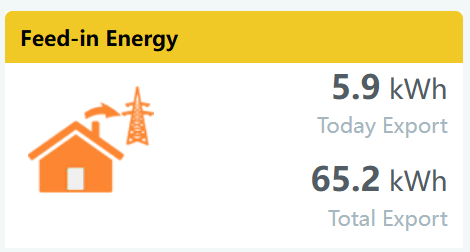
Posted : November 5, 2025 2:50 pm

Did you have your CT set to reverse before you did the system update and now they are defaulted to not reversed?
I had moved my CTs and thought I matched their direction but got it wrong and something triggered exporting even though I had 0 kW export and a few other don't export settings. Swapped the CTs and the problem cleared. So recheck your CT direction.
This post was modified 11 months ago by DougL
Posted : November 6, 2025 5:10 am
BobAndRoslyn reacted
Topic starter
@dougl Correction: We had the Advanced setting "CT Direction Reversed" enabled before the update. After the update the setting was disabled. I re-enabled it and that fixed the issue. That seems like a bug. I worked with Signaturesolar.com to resolve, always helpful.
Posted : November 6, 2025 1:28 pm
DougL reacted

Were you able to get the LCD firmware updated?
Posted : November 6, 2025 4:55 pm
Topic starter
@eg4eric Yes. It took a couple of tries, but now at v23.
Posted : November 6, 2025 6:40 pm

Where is this firmware?...the forum only lists -2021. What was changed? And where is V23?
I am at -2021 and V18 and am reasonably happy with it, so I may wait until this has had more stick-time. I would like to update my LED display to V23 but am not sure it is compatible with -2021.
Posted : November 6, 2025 8:36 pm
Topic starter
@caesarv The update is available via the https://monitor.eg4electronics.com/WManage/web/maintain/ remoteUpdate page. I had SignatureSolar.com support assist with the LCD update.
Posted : November 6, 2025 8:40 pm
Thanks, I see it now...not sure why it is not listed on the forum.
Posted : November 6, 2025 8:46 pm
I had SignatureSolar.com support assist with the LCD update.
Is the LCD update less straight forward? I had a ticket open on the constant export problem and EG4 support went through the firmware update but a few weeks ago I noticed my LCD display was not showing correctly. I didn't recall doing an LCD update and should probably do it in the event an on-device setting situation pops up.
Posted : June 15, 2026 3:01 pm
