
Notifications
Clear all

Topic starter
I operate one 6000XP inverter and two EG4 280AH Indoor WallMount batteries at a very remote location that has no grid power or cell service available. I don't have satellite internet service (though I probably could). The inverter is running firmware version ccaa-190D0E, and I do not plan to update, because ccaa-190D0E works fine, most of the later updates don't affect my usage, and many 6000XP users have experienced problems with the later versions.
If and when I decide to parallel a second 6000XP with the first, I will either want to update the older inverter's firmware OR 'downdate' the new inverter's firmware to ccaa-190D0E. I have the EG4 mobile app on my smart phone and the 6000XP wi-fi dongle, and I understand the 6000XP firmware can changed with the mobile app and wi-fi dongle.
If I want to update the firmware, is is possible to:
1. download the newest firmware to my phone, when I am home and have a normal internet connection,
2. turn off the phone,
3. travel my remote site, and
4. update the 6000XP using the phone app and the firmware files stored on the phone?
If I want to downdate the firmware on the newer inverter , is it possible to:
1. copy the ccaa-190D0E files (which I have) to an appropriate folder on my phone,
2. turn off the phone,
3. travel my remote site, and
4. update the 6000XP using the phone app and the firmware files stored on the phone?
I am asking on behalf of myself and several members at DIYSolarForum.com. Thanks.
Posted : December 19, 2025 11:02 pm

I'm subscribing.... I absolutely need the same capability; to update from file on laptop or phone at remote sites that do not have cell or wifi.
Posted : December 22, 2025 3:00 pm
jxnhrpr reacted

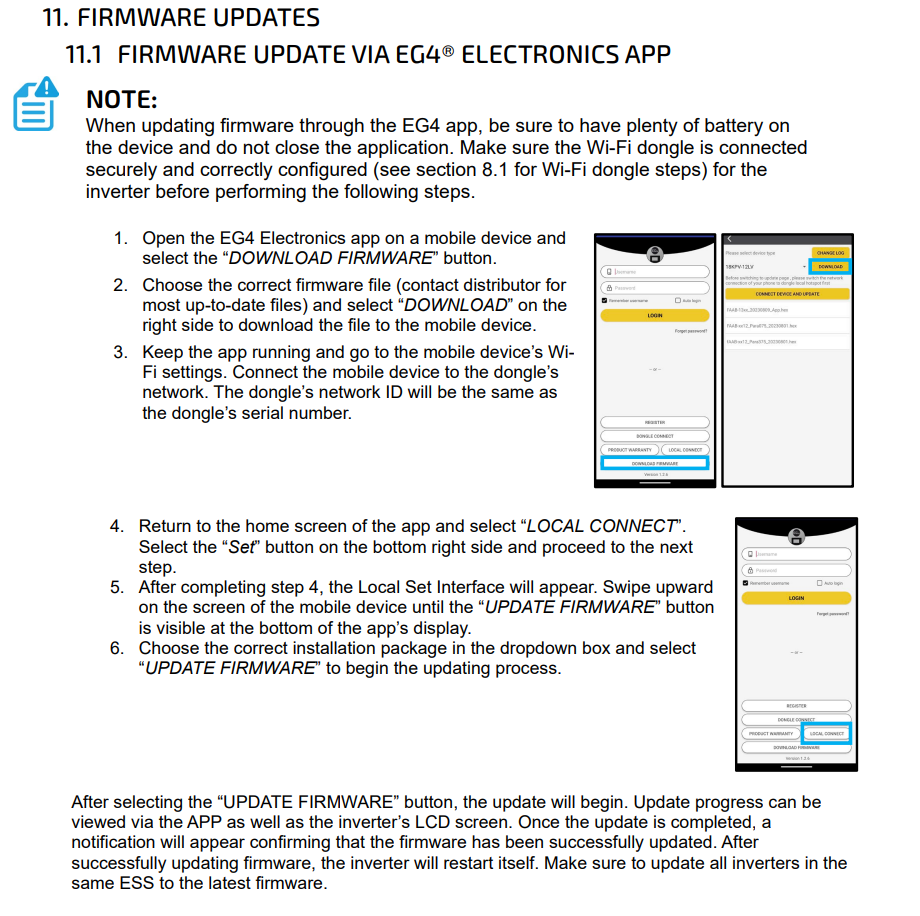
The app is not designed to download and store the firmware file after the app is closed. You can download the firmware and keep the app open until you get to the inverter and install it, but if the app is closed or the phone is turned off, the firmware file will be removed.
As of now, the only way to downgrade the firmware is to do it manually through the EG4 Monitoring Website. So, the inverter would have to be online.
Posted : December 22, 2025 9:08 pm
@eg4eric what would be the exact steps to download a firmware update to the Phone App or a laptop in a location you HAVE wifi available, travel, and then upload to a 6000xp or 12000xp at a location that does not have wifi or cell service?
...and are there updates available for both/either the 6000xp and 12000xp that fix the bugs in open-loop charging of user defined Li batteries with voltage setpoints? i.e. a true CC-CV curve with a definable float voltage after end of charge ?
Posted : December 22, 2025 10:11 pm
You’ll need to download the firmware through the app and keep the app open the entire time. Once you’re at the location, connect to the inverter and proceed with the firmware update. This is currently the only method available if you don’t have internet access or cellular service on-site.
Regarding open-loop charging, I don’t have a confirmed answer at this time. I have heard that the most recent firmware improved battery behavior when operating in Lead Acid mode, but I don’t have specific details on what changes were made.
Posted : December 23, 2025 5:34 pm
Topic starter
In response to my original inquiry, you said, "As of now, the only way to downgrade the firmware is to do it manually through the EG4 Monitoring Website. So, the inverter would have to be online."
If I were to purchase a second 6000XP, I suppose I could make it temporarily operational at home (where it can connect to the internet), have EG4 downgrade the firmware online, and then move the inverter to my remote site. In this situation I could provide 120VAC to the GRID or GEN inputs to power the inverter, but I would have no batteries or solar panels connected. I read somewhere that firmware changes require the AC Output and PV On/Off switches to be on, and maybe there needs to be DC voltage/current connected to the PV input.
Besides connecting the Wi-Fi dongle to the internet, can you explain what is necessary to get the inverter ready for a firmware change?
Posted : January 27, 2026 7:11 am
@jxnhrpr
As long as the inverter has at least one power source, the firmware will install. However, if PV is not connected to the inverter, the MPPT portion of the firmware will not be updated.
Posted : January 28, 2026 6:53 pm
Topic starter
Could that PV input be some type of benchtop power supply, rather than solar modules that I don't have at home.
Posted : January 28, 2026 7:03 pm
@jxnhrpr
I can’t recommend anything other than solar panels, as the MPPT inputs were specifically designed for that purpose.
Posted : January 28, 2026 10:58 pm
Topic starter
I thought a non-panel DC source might be possible because the EG4 Monitoring application has a PV Input Mode option of "0:DC Source". What does that setting do?
Posted : January 29, 2026 5:36 am
@jxnhrpr
I’m not fully certain what that setting controls, but I can investigate and follow up with more details.
Posted : February 6, 2026 4:35 pm
Posted : February 8, 2026 9:13 pm
Page 1 / 2
Next
