
Notifications
Clear all

Topic starter
I recently purchased a Wi-Fi + Ethernet Dongle. I'm currently having issues with it loosing the Wi-Fi connection (Distance issue). This is pretty much the reason that I had purchased this adapter in the first place as I wanted to remove my dependencies from Wi-Fi and range issues by having a direct Ethernet connection to my router.
Currently the adapter is connected to my network through both Ethernet and Wi-Fi. I am experiencing the following issues with this dongle.
-
Sometimes the Wi-Fi connections drops out. This would still be ok if the Ethernet path would take over, but it does not in my case.
-
There is no way to determine if the dongle is running under Wi-Fi or Ethernet. When I look at the EG4® WI-FI ETHERNET MONITORINGADAPTER QUICK START GUIDE. It says the following -How can the end-user determine the current communication mode of the dongle (Ethernet or Wi-Fi)?
• Check the IP LED flashing frequency. Ethernet mode: IP LED flashed slowly (once per second). Wi-Fi mode: IP LED flashes rapidly (three times per second).
My dongle does not show these flash rates with the IP LED. It's only solid on. As such, I can't be sure which path is being used.
Also, the two network LED's at the dongle's recessed Ethernet connection, I see, are not on or flashing. Don't know if this is supposed to
work to indicate if this connection is working properly and data is active.
I did run an experiment verify that the Ethernet path does not work. I did this by making sure that the Wi-Fi signal could not be received by
wrapping the dongle with some aluminum foil. I made sure that my both my Wi-Fi router and my phone could not receive the dongles signal.
I then looked at the EG4 monitoring app and saw that I had no inverter data reporting back, where prior to wrapping the dongle with
aluminum foil, I had proper data coming back. So it seams obvious that there is no dongle Ethernet communications happening. Is the dongle supposed to revert to the Ethernet path if the Wi-Fi is down?
3. I see that this dongle has version V1.1. Suspecting a newer version, I then tried to see if there was an update for it even though this is a new Dongle just received from Current Connected.
The EG4® Wi-Fi Dongle DONGLE FIRMWARE UPDATE guide says to first connect to the dongles Wi-Fi and to select Dongle connect.
FYI, My IOS phone App is at V1.6.6 so that should be good. Then to connect to the dongles Wi-Fi serial number. In my case it's DQ53BLANK.
Which it does and stays connected. Then to use Dongle Connect, Bluetooth Connection. I'm then supposed to see the dongles Serial Number.
This does not show up for me and nothing else shows up, i.e. page is blank so I can't select anything. I then looked at the Bluetooth signal
area in my phone thinking that maybe it's a Bluetooth signal I should be using. None were found. So instead I went back to the app and
selected -
Dongle Connect - Wi_Fi Connect.
This method shows a button for V1.1 - Update firmware. Pressing that pulls up a firmware button labeled as - V1.1 - Update firmware.
Pressing that button then gives me the message of - Upgrade is successful. Please wait for another 2 minuets for the dongle to restart.
I then see the dongles 3 LEDs flashing and the it resets and re-establishes the Wi-Fi connection. I can also view the dongles connection
perimeters which all appear correct, but again no indication of which type of connection is is (Wi-Fi or Ethernet).
3. In any case, How can I get the Ethernet path to work?
a. Is V1.1 the latest version for dongle DQ53BLANK that I should be running? If not, where can I find the latest and how can I load it?
Can it be updated remotely?
Note that the web app also confirms this same version - WIIL xxxx V1.1 12/13/25 Connected
b. Would a newer version even fix the problem?
One other question. Does this dongle support Bluetooth? The reason I ask is that the DONGLE FIRMWARE UPDATE guide may be incorrect by stating to use Bluetooth.
Posted : February 11, 2026 1:12 am

@fkitzmann
Can you disconnect the dongle and connect it again? It should display the blinking IP LED on the dongle.
You can also hold the reset button for 5 seconds to switch between Ethernet and Wi-Fi. This is when you should see the IP LED blinking.
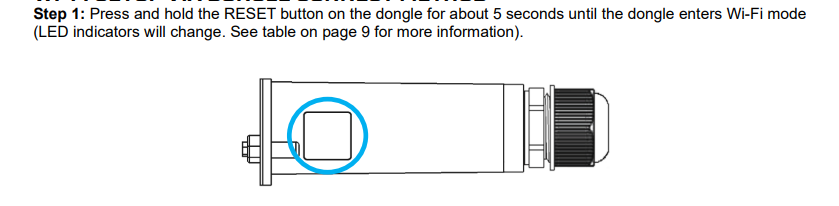
Posted : February 12, 2026 6:35 pm
Topic starter
I had done both as you suggested prior to this initial post. Doing again now to log response.
1. Unplugged the dongle and connected it again. LED's IP Rapid blink for ~20 Sec then solid on, then cloud Rapid blink for ~ 5 sec, then Inv Rapid blink for ~ 5 sec. No IP address seen on my router.
2. Hold the reset button for 5 seconds. All LED's off for ~5 sec. LED's IP - Solid on, then 2 sec later cloud Rapid blink for ~ 5 sec, then solid on, then Inv Rapid blink for ~ 5 sec then solid on. No IP address seen on my router (Either wireless or direct). Maybe the IP is out of the range of my router or it's not working.
To test for Ethernet path only. With no Ethernet cable connected. I then wrapped dongle with 2 layers of aluminum foil and cycled power to dongle. This should prevent any WIFI communications. I verified this by looking at my phones WIFI connections and confirmed that dongle was not communicating. I then looked at the EG4 monitor app and see that I have lost update data on its main page. Then verified that I could not receive any data on the maintenance page. It reported Off Line. I also looked at Configuration Dongles tab. It reports that the connection status was Lost. So no WIFI received at this point. Now I connected the Ethernet cable. I see no activity on my network switch LED's. Maintenance still reports Device offline. Configuration Dongle still shows Lost. Main page does not have any active data.
So it seams as though the dongle's Ethernet path is either not working, it needs to be configured, it needs a software update. Or my Ethernet cable is bad. I'll have to confirm that it's not the cable at a later date. Also note that the dongle's IP LED does not conform to what the quick start guide says -
How can the end-user determine the current communication mode of the dongle (Ethernet or Wi-Fi)?
• Check the IP LED flashing frequency. Ethernet mode: IP LED flashed slowly (once per second). Wi-Fi mode: IP LED flashes rapidly (three times per second).
There is never any flash frequency. It's always solid on. Again, Is V1.1 the latest version? Should I be able to switch between WIFI vrs Ethernet by using the reset button?
Posted : February 13, 2026 5:55 am
Topic starter
Also - Should the dongle auto switch from WIFI to Ethernet if WIFI is lost?
Posted : February 13, 2026 5:57 am

Why don't you just remove the wifi config (SSID and passkey),from the donglemso you are sure it cannot connect to wifi? I'd rather be sure as opposed to the tinfoil hat....😂
Posted : February 13, 2026 2:17 pm
Can you please share a video of what you are seeing?
You should be able to hold the button for 5 seconds to switch between Wi-Fi and Ethernet.
Posted : February 18, 2026 9:29 pm
Topic starter
Here's the results that I have discovered.
1. I verified that my Ethernet connection path from the dongle to my router was working properly.
2. Verified dongle was not using WiFi path by turning off my WiFi radios in my router. Then verified that WiFi path to dongle was reported as lost.
3. Connected Ethernet cable to dongle. No wired connection established after many minuets.
4. Performed 5 sec reset. Got Ethernet path to work. No outside indication on dongle to indicate what path the data is taking - i.e.
external LED's IP, Cloud and INV are steady on. In EG4 web app under tabs Configuration, Dongles, there is no indication of which path is currently active. Thought that the Dongle's IP LED was supposed to have a different blink rate based on the current path. Maybe this blink rate only happens during boot up? If so, this is not a very good indicator of path, as I have not noticed this.
5. Discovered that after a path has been established (either Ethernet or WiFi) if that path is lost the dongle does not auto switch to the other path. It has to be manually switched by doing a physical manual reset.
6. EG4 Phone app - If running under Ethernet path, EG4 phone app Dongle Connect and Local connect is not accessible. It appears as though the dongle's WiFi radio gets shut down if only running under the Ethernet path.
Future changes -
Posted : February 22, 2026 10:45 pm
Topic starter
a. Have a clear indication of which path is currently active.
Consistent blink - IP LED flashed slowly (once per second). Wi-Fi mode: IP LED flashes rapidly (three times per second).
b. Indicate which path is currently active in the Web app - under tabs Configuration, Dongles. Maybe listed as Connected WiFi or Connected Ethernet.
c. There are two LED's (Yellow & Green?) on the Ethernet connector burred in the dongle. Typically these are used to indicate speed of connection and data activity. Are these LED's connected to anything in the dongles design? Can they be enabled?
d. The dongle does not do actively auto switch between WiFi and Ethernet paths. If on say the WiFi path and it goes down but Ethernet path is good and vice versa. The only way to switch this is to manually do a 5sec reset. I would think that the dongle's firmware could be smarter then this.
Maybe all of the above can be pre-programmed for the next version update?
Posted : February 22, 2026 11:06 pm
I can definitely share with the team so we can get this issue resolved.
In the meantime, would you like for me to send a replacement dongle to see if that resolves the issue?
Posted : February 23, 2026 4:48 pm
Topic starter
Only if you think that there is a hardware issue with mine or a new version of software. Thanks.
Posted : February 25, 2026 6:08 pm
