
Notifications
Clear all

Topic starter
October 22, 2024 10:48 am
How to set up the remote monitoring for a customer? We have numerous customers, i only want them to see their house and not be able to adjust any settings. I monitor all of our customers each morning, but only want them to see their house.
Joel Brodeur reacted

October 22, 2024 2:18 pm
When creating an account for your customer, ensure that your installer code is entered correctly.
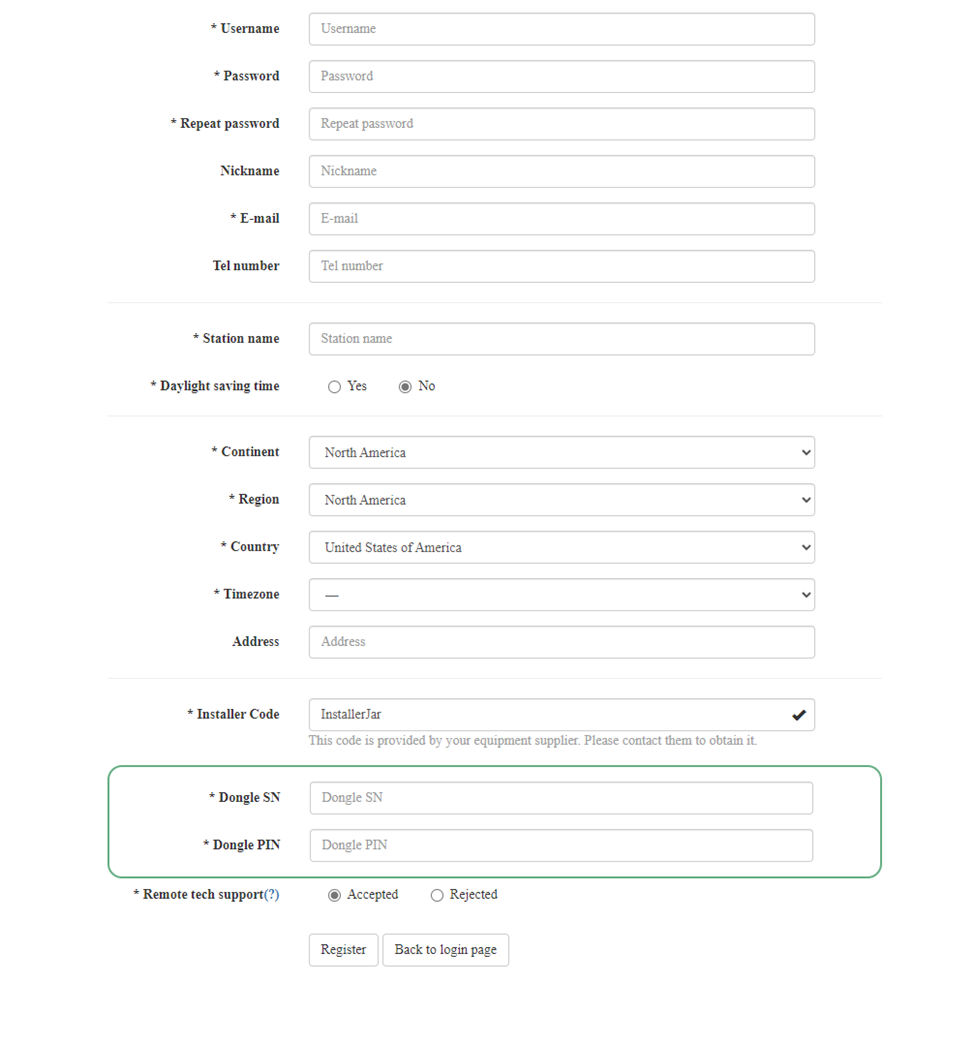
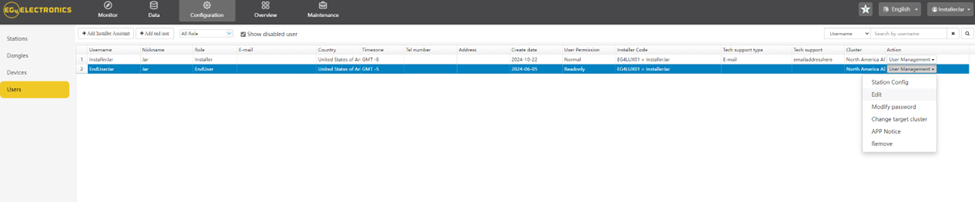
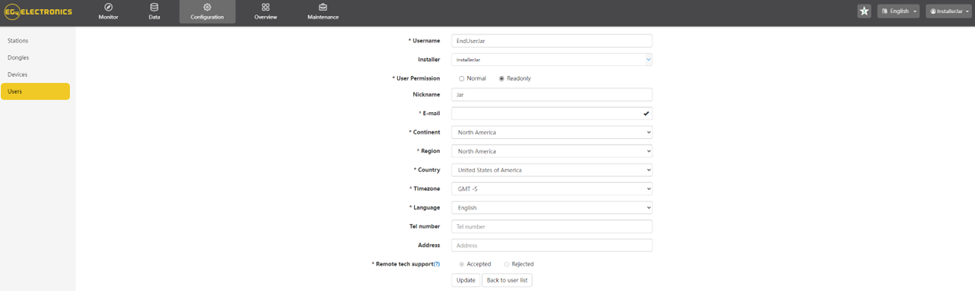
After this step, and once the customer is linked to the station, navigate to Configuration > Users, where you'll find a list of end-users associated with your installer code. From there, go to User Management > Edit > Read Only > Update. This will allow the customer to view their station but prevent them from updating or changing any settings.

October 22, 2024 2:25 pm
I don't mean to hijack the thread so if this is inappropriate, please let me know, I will move to a new thread, but I think it applies.
I have installed my own system off grid. I have some neighbors that have also installed their own systems. We would like to be able to have "read-only" to each other's systems to help monitor when we are out of town or need to bounce ideas off of each other.
Since we are each set up as a homeowner and not an installer, we do not have access to giving other permissions to our systems. Is this something that can be done?
Thanks,
JB
Sometimes the easiest solution is the best solution.
Sometimes not.
October 22, 2024 2:35 pm
@joel-brodeur At the moment, this isn’t available. However, we are always looking for ways to improve the monitoring system and may be able to offer it in the future. It’s definitely something that has been discussed and considered.
October 22, 2024 3:00 pm
@joel-brodeur At the moment, this isn’t available. However, we are always looking for ways to improve the monitoring system and may be able to offer it in the future. It’s definitely something that has been discussed and considered.
That would be fantastic.
Thanks for the information,
JB
Sometimes the easiest solution is the best solution.
Sometimes not.
Topic starter
December 14, 2024 1:47 pm
@jared Cannot seem to get past the registraion since the Dongle information is already in use? How would i register them as i am the installer? Sorry for the confusion
December 16, 2024 4:22 pm
Feel free to send me a DM and I can help get this corrected.

May 12, 2025 8:06 pm
Hi Jared,
I cannot DM you as I just made my forum account. I installed an 18kPV system at my sister's property. She registered a monitor account with her system and is labeled as "end user." I wanted to also make an account to keep an eye on her system for her, but I cannot make an account without a new system serial + pin. Is there a way for me to make an EG4 monitor account and add her system to it? Either as an "end user" or an installer level account?
This post was modified 2 years ago by jtivald
May 12, 2025 8:54 pm
@jtivald unfortunately, this is not a possibility at this time. However, we are always looking at ways to improve the app and monitoring system.

May 18, 2026 4:47 pm
Any movement on this? Seems like a pretty basic function to me.
May 18, 2026 5:01 pm
If you land here, the easy way around this is to remove the dongle from the station, delete the station, and recreate the station at the same time as you register your customer, and add yourself with you installer code, checking the "allow for remote access" checkbox. Cheers!

November 19, 2026 6:45 pm
I am BOTH the homeowner and the installer of my system.
I am NOT HAPPY that I cannot set up a read-only login for my system.
WHY NOT?


November 19, 2026 10:48 pm
I can create an end-user account for you if you don’t already have one associated with your system.
November 20, 2026 2:09 am
I already have an account. But it is full control.
The point is having a 2nd READ-ONLY account that has no ability to write/modify.
I wish to monitor my own system with an AI bot monitoring. I do not want it to have write access.
November 20, 2026 8:30 pm
@diglloyd
I understand! Thank you for the explanation. As mentioned, I'm sending this to the correct team for them to review and consider for the future.
