
EG4 Community Forum

EG4 wifi dongle una...
 
Notifications
Clear all

Breaking EG4 wifi dongle unable to connect

46 Posts
23 Users
1 Reactions
14.6 K Views
Posts: 5
Topic starter
(@nathanfaught)
Active Member
Joined: 2 years ago

My dongles are not connecting to the EG4 monitor center

I recently setup the Flexboss and Gridboss at my house and had the dongle's successfully reporting to the EG4 monitoring center.

However, earlier yesterday, I performed the action "reset to factory" while locally connected to both units, I then re-connected the dongle's to my WIFI, but they were no longer able to connect to the monitor center.

Upon further I found the Dongle Connect Params had changed for the section "Network 1 State", specifically the "Remote Port" had changed from us2.solarcloudsystem.com (3.101.7.137) to the IP 120.79.53.27.

My firewall shows both dongle's constantly to connect to 120.79.53.27, but the dongle itself never succeed in establishing a connection to the EG4 monitor center.

How can I reset the dongle's internal remote port value back to us2.solarcloudsystem.com (3.101.7.137)

Attaching a couple images of the dongle connect params showing the internal change to the remote port value.
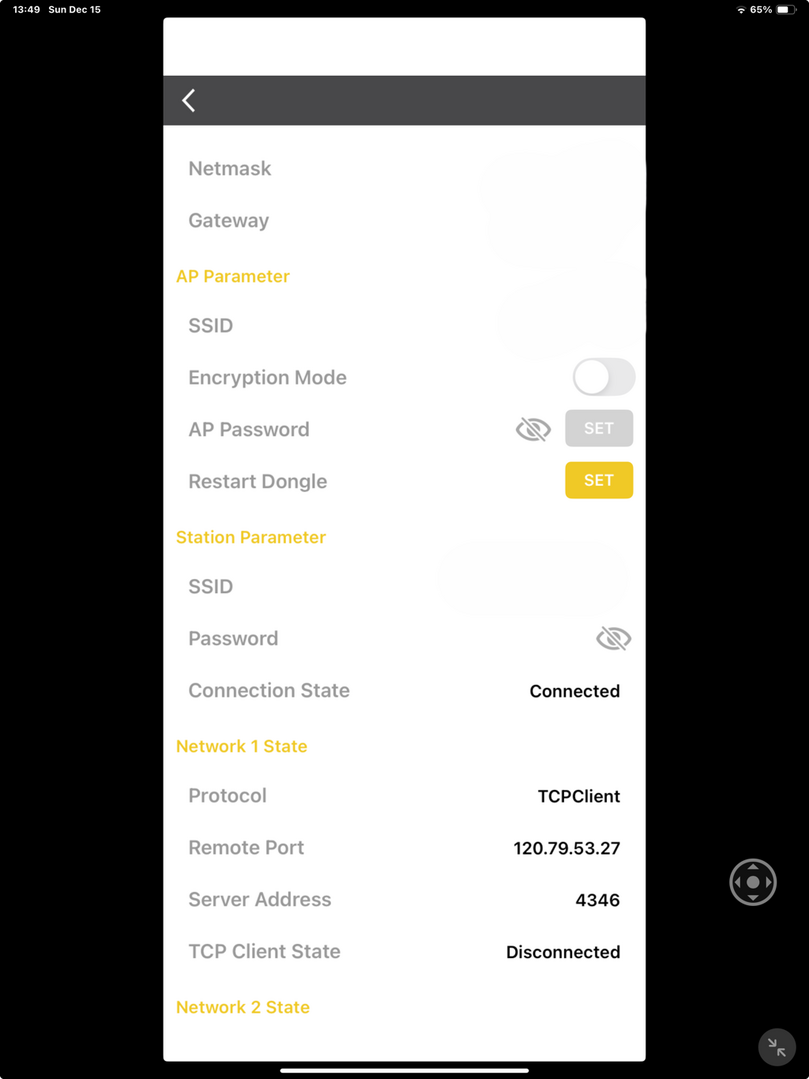
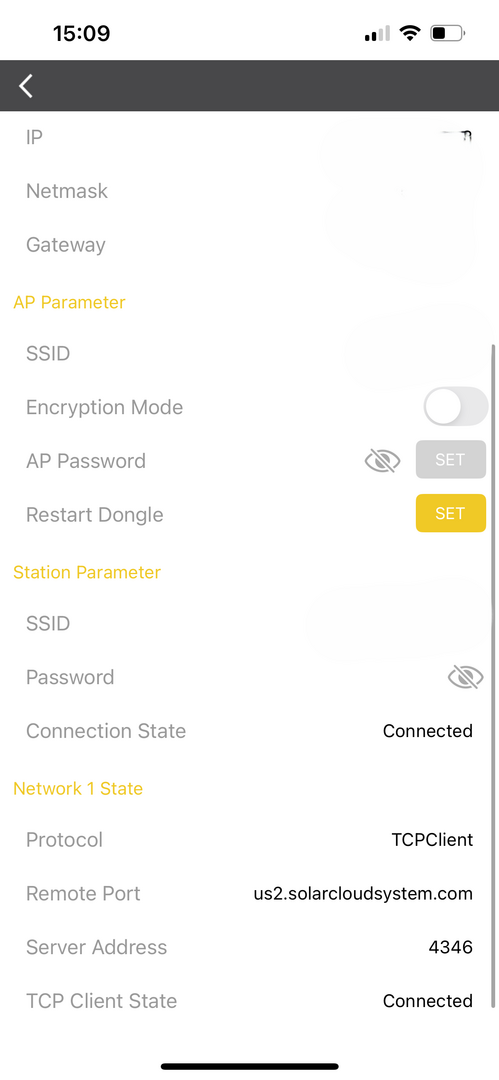
DongleParamsAfter
DongleParamsBefore


Topic Tags
45 Replies
Jared
Posts: 261
Admin
(@jared)
EG4 Electronics
Joined: 2 years ago

Would you be able to DM the Wi-Fi dongle serial numbers?


Reply
4 Replies
(@kpostler)
Joined: 2 years ago

New Member
Posts: 1

@jared

Hi Jared, I just installed a flexboss and gridboss yesterday and had to reset dongle thinking it might be the problem and now I can’t dongle to connect to correct EG4 server as with this OP. Will send you serial number like others have. Thanks you


Reply
 Brad
(@brad)
Joined: 1 year ago

New Member
Posts: 3

@jared 

I tried to reset my account on dongle, stopped working. 
Can you reset from the cloud to start over?


Reply
EG4 Eric
Admin
(@eg4eric)
Joined: 2 years ago

EG4 Online Support
Posts: 1151

@brad 

Can you send me a screenshot of the dongle parameters and send me the dongle serial number and I will do my best to get it reset as soon as possible.


Reply
 Brad
(@brad)
Joined: 1 year ago

New Member
Posts: 3

@eg4eric I’ve left my cabin where it’s installed, I can send the information when I return next spring.

thanks for replying 

Brad


Reply
Posts: 5
Topic starter
(@nathanfaught)
Active Member
Joined: 2 years ago

Thanks for the fix.


Reply
Posts: 5
(@wvannus)
Active Member
Joined: 2 years ago

I've got this exact issue too. I reached out to Signature Solar who are working on it.

Also, I find it interesting that the Address and Port fields seem to be reversed, but the tech at Signature Solar confirmed that's normal.


Reply
Jared
Posts: 261
Admin
(@jared)
EG4 Electronics
Joined: 2 years ago

Would you be able to DM me the serial number for the Wi-Fi dongle? I can take a look at this as well.


Reply
1 Reply
(@jetjock)
Joined: 6 months ago

New Member
Posts: 1

Hey Jared, after Sig Solar did an online software update for my 314ah wall mount indoor batteries I found that my GridBoss is now no longer online. I have tried doing a full shutdown and restart (using the checklist SS provided), unplugging the dongle for 60 seconds and then plugging back in, deleting the dongle and then adding the dongle, and connecting to the dongle via bluetooth and setting up the wifi again. Nothing has worked. Flexboss is online and working well but Gridboss is just showing offline. HELP!!!!!


Reply
Page 1 / 6
Share: